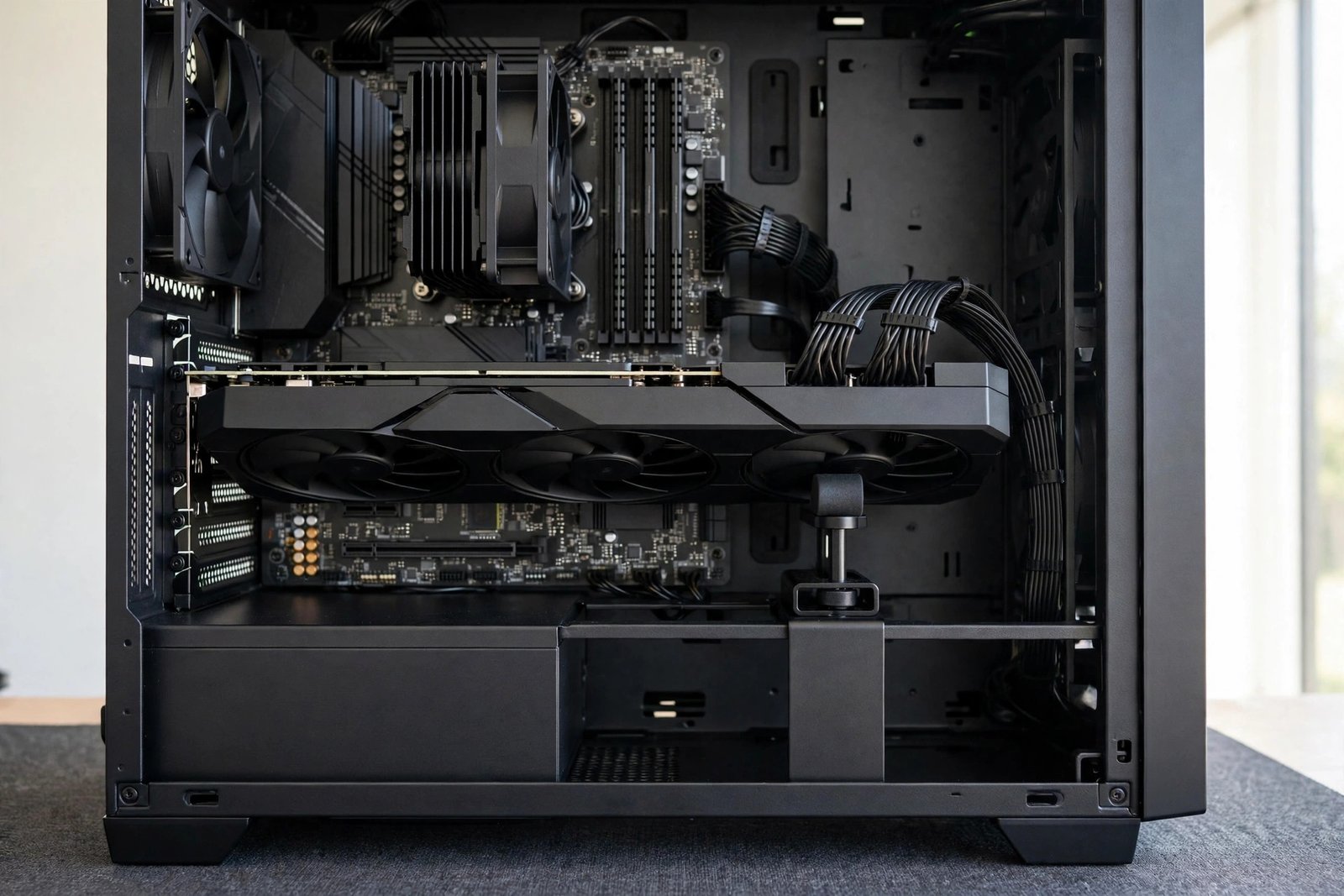
GPU sag is when a heavy graphics card droops at its unsupported end, bending the PCIe slot and straining the connector. To fix GPU sag: slide a support bracket or GPU stand under the far end of the card so it sits level; it costs under fifteen pounds and takes five minutes. Left alone, sag can cause crashes, poor contact and long-term damage to the motherboard slot, so it is worth sorting as soon as you spot it.
What Is GPU Sag?
Modern graphics cards are big. Triple-fan models can weigh well over a kilogram, and all of that weight hangs off one end of the PCIe slot, held in place by a single bracket screw at the back of the case. Over time, gravity wins and the far end of the card droops downwards by a few millimetres, sometimes more. That visible tilt is GPU sag.
It has become more common as cards have grown longer and heavier, and as tempered glass side panels put the inside of every PC on display. A slight tilt is mostly cosmetic, but a pronounced droop puts real mechanical stress on the slot and the card’s own circuit board.
Why Does GPU Sag Matter?
- Strain on the PCIe slot: the slot and its solder joints were not designed to carry a kilogram of card at an angle for years on end.
- Poor electrical contact: a tilted card can make intermittent contact, causing crashes, black screens or the card not being detected at boot.
- Stress on the PCB: the card’s own board can flex, which in extreme cases cracks solder joints.
- Blocked airflow: a drooping card can press against fans or shrouds below it, choking airflow and raising temperatures. If heat is your main worry, our gaming PC overheating guide covers the wider cooling picture.
- Resale value: a card that has sagged for years looks tired and can put off buyers.
How to Check If Your Graphics Card Is Sagging
Look at the card side-on at eye level. The top edge should run parallel to the motherboard; if the far end sits visibly lower than the bracket end, you have sag. A small spirit level or a ruler held against the case works as a check. Telltale symptoms include the PC occasionally failing to detect the card, or crashes that stop when you gently lift the card’s far end while it runs. Only try that with the case open and your hands well clear of the fans.
GPU Sag Fixes Compared
Every fix below works; the right one depends on your budget and your case.
| Fix | Typical UK cost | Difficulty | Best for |
|---|---|---|---|
| Support bracket | £8-£15 | Easy | Most builds; screws to the case |
| GPU stand or pillar | £6-£12 | Easy | Compact cases with a PSU shroud to stand on |
| Vertical GPU mount | £30-£60+ | Medium | Showcase builds with glass panels |
| DIY prop (e.g. stacked blocks) | Free | Easy | A temporary fix while a bracket ships |
| Case with built-in card support | £80+ | Medium | New builds and major upgrades |
How to Fit a Support Bracket
The humble support bracket is the best answer for most people. Power down and switch off at the wall, then loosen the card’s bracket screws and gently lift the far end until the card sits level. Slide the bracket into place so its padded top rests under the card’s far edge, then tighten everything back up. Most brackets screw into spare motherboard standoff holes or clamp to the case, and the whole job takes about five minutes.
Other Ways to Fix GPU Sag
GPU stands and pillars sit on the PSU shroud and prop the card up from below. They are cheap, need no screws, and suit cases where the shroud sits close under the card.
Vertical GPU mounts rotate the card to face the side panel, which eliminates sag entirely and shows off the cooler through glass. Check that your case supports vertical mounting and budget for a quality PCIe riser cable, since cheap risers can cause stability problems.
Repositioning costs nothing: make sure the card is in the top PCIe slot (the reinforced one on most modern boards) and that the rear bracket screws are properly tightened. Some builders also run the power cables with a little upward tension to take weight off the card, though that is a tweak rather than a fix.
Choosing the right case matters for new builds. Many modern cases include built-in GPU support arms or anti-sag brackets, so check reviews before buying.
While you have the case open, it is a good moment to optimise the card itself: our guide to how to undervolt your GPU for gaming shows how to cut its temperatures without losing performance. Laptop gamers with heat problems rather than sag should read our laptop overheating guide instead.
Frequently Asked Questions
Is GPU sag actually dangerous?
A slight tilt is mostly cosmetic, but a pronounced droop can strain the PCIe slot, cause intermittent contact and lead to crashes. It is cheap and easy to fix, so there is no reason to leave it.
Will a support bracket affect my GPU cooling?
No. Brackets and stands touch only the edge or backplate of the card and do not block the fans or heatsink fins. A level card can even cool slightly better, because its fans are not pressed against anything below.
Can I use LEGO or stacked blocks to support my GPU?
As a temporary measure, yes, and plenty of builders do. Use non-conductive materials, keep them clear of fans and circuitry, and replace the bodge with a proper bracket when you can.
Does GPU sag void the warranty?
Sag itself does not void anything, and fitting a support bracket is a non-invasive fix. If a badly sagging card has already damaged the PCIe slot, though, that physical damage may not be covered, which is another reason to support the card early.
About the Author